Your orders only show
the purchases that were completed.
What about the products that landed in the cart but were never ordered? Which variants get added most often? How do cart values develop? And which carts actually turn into orders later?
Classic order reports answer these questions only in part. FLAVOR adds the missing view before the purchase: it records cart states and turns individual cart actions into shop data you can analyse.
Your shop. Your numbers.
In your inbox every week.
FLAVOR sends you a regular, compact overview of purchase interest in your WooCommerce shop, without you having to dig through statistics every day.
- Most wanted products and top 10 rankings
- Cart development and distribution compared with the previous week
- Completed and open carts
- Product removals, if optional activity tracking is switched on
- Sent automatically to the internal email addresses you configure
FLAVOR does not send automatic marketing or reminder emails to customers. Where customer contact is possible and wanted, a manual email template is available.
Explore the weekly report and analytics →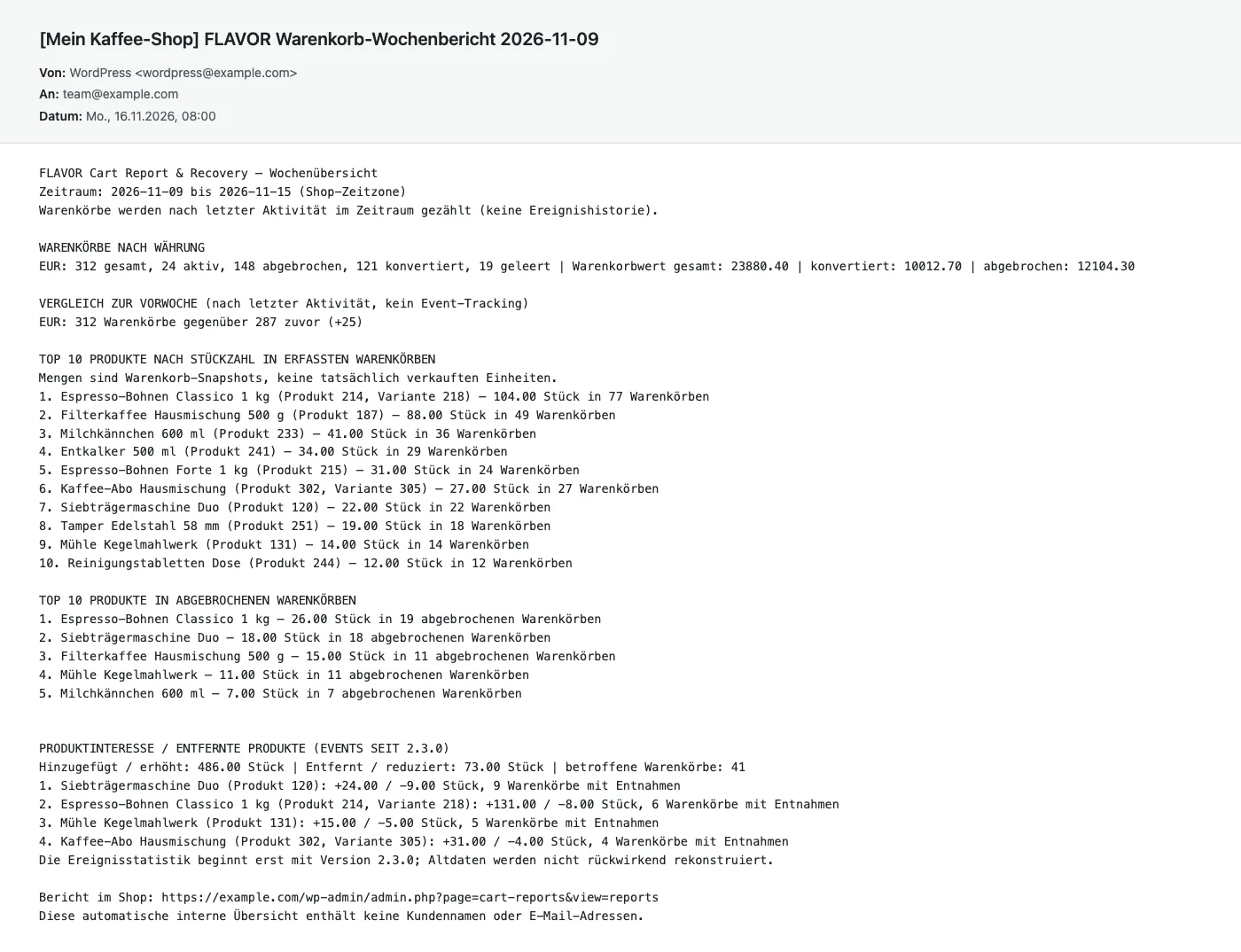
Every important cart signal
in one place.
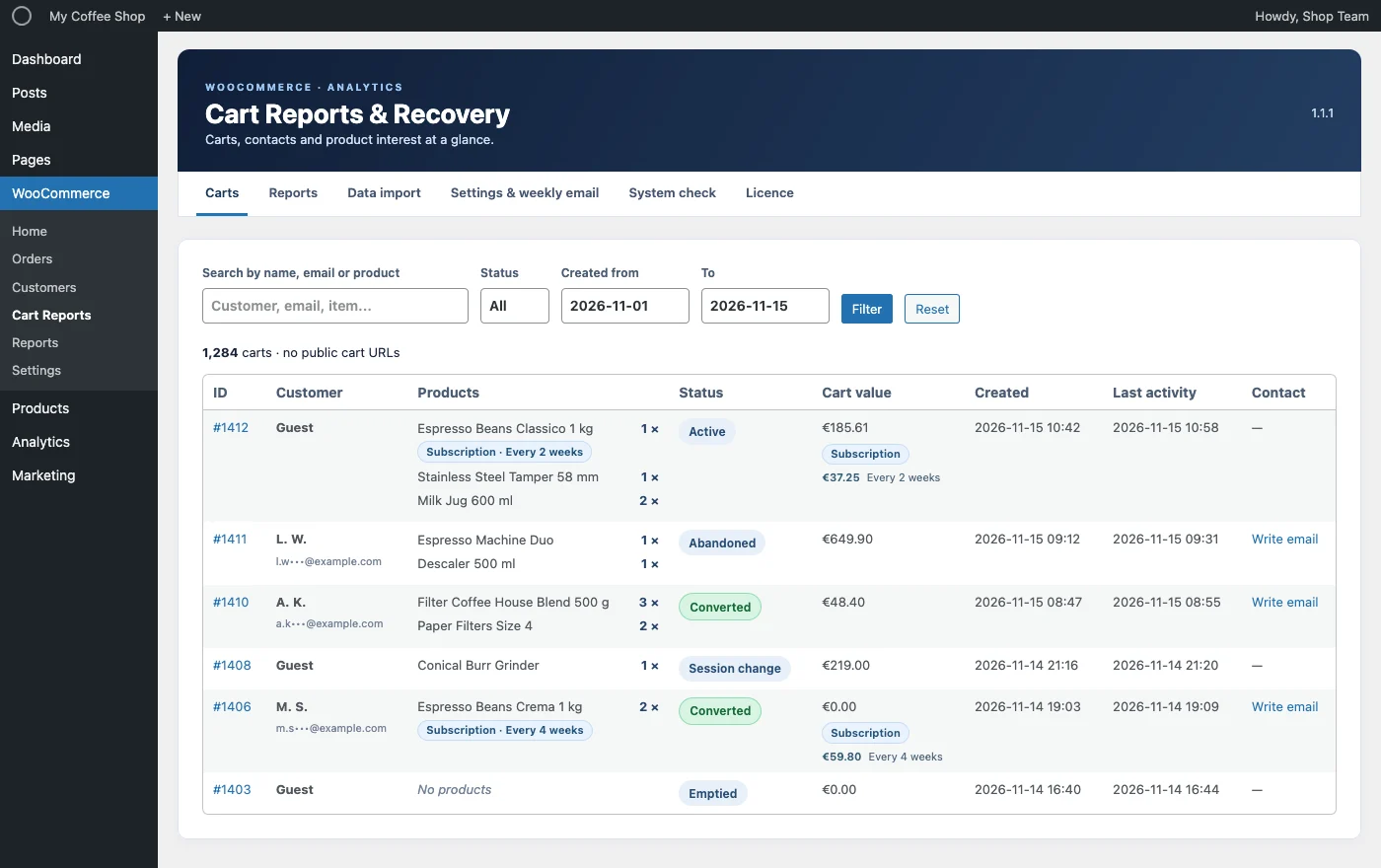 Cart overviewEvery cart in viewSee products, quantities, customer link where available, status and cart value. Subscription products are marked with a badge right away.
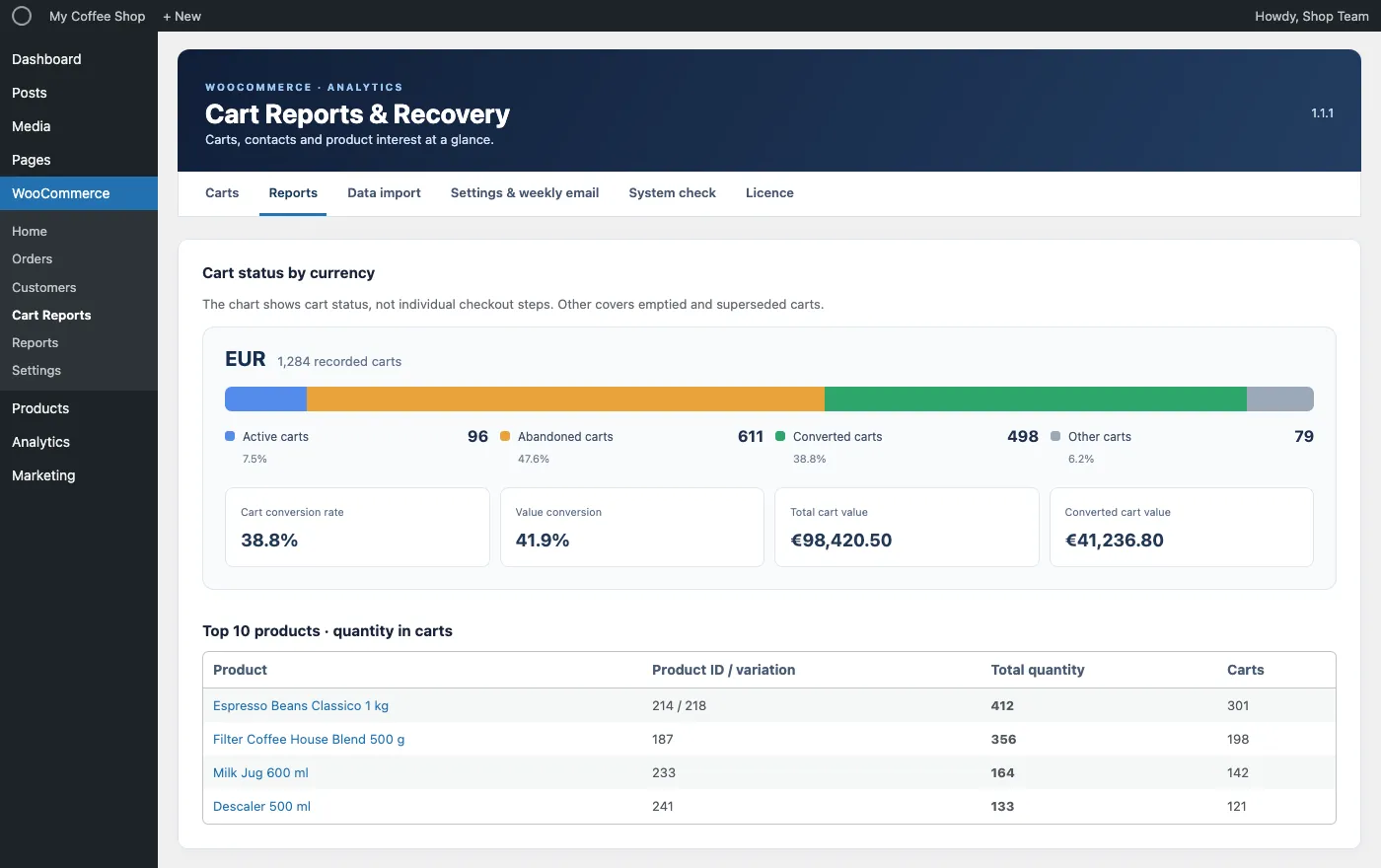 ReportsFrom data to decisionsAnalyse cart status, product interest, values and conversion figures, split by currency so totals are never mixed up.
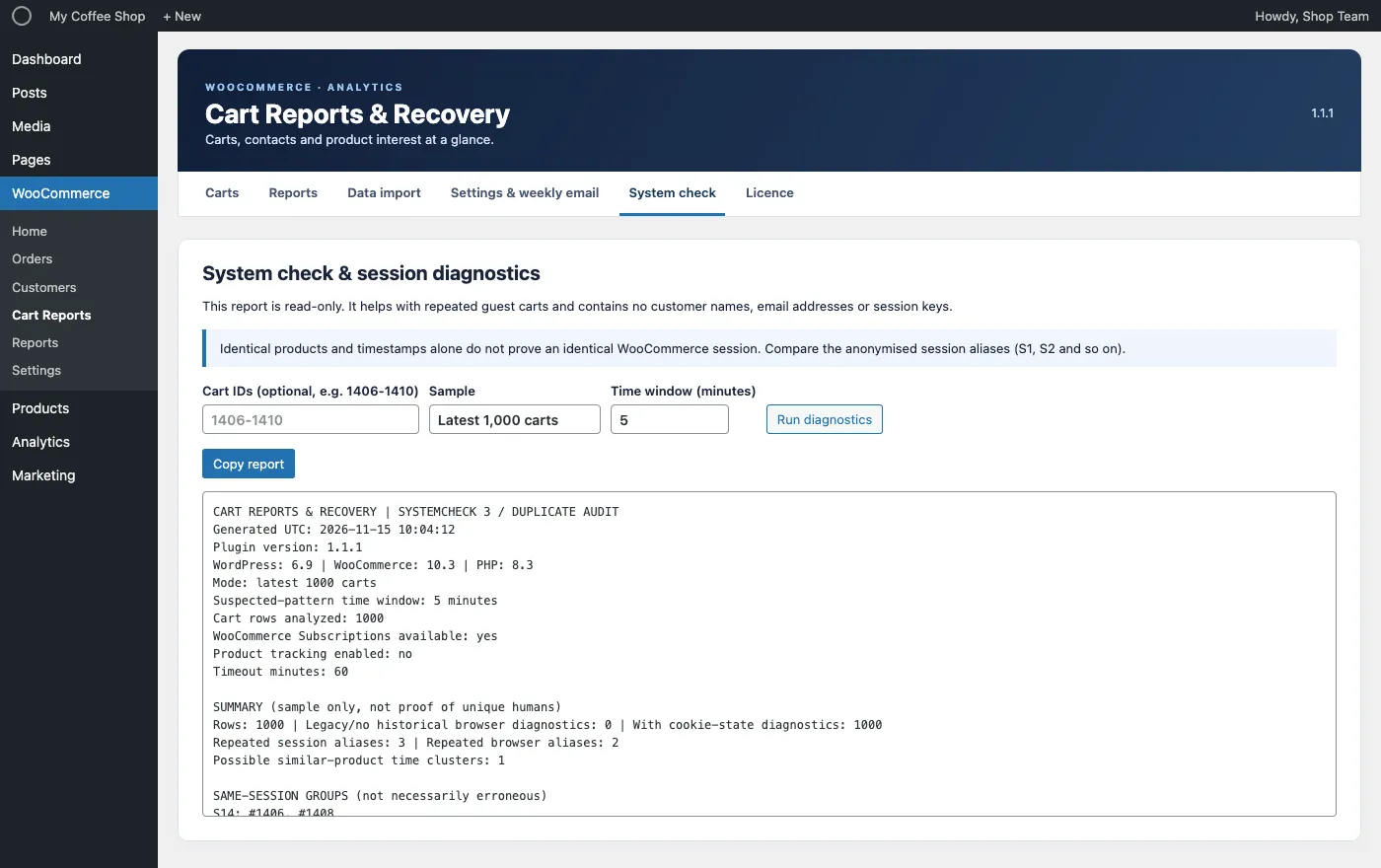 System checkData quality, not guessworkInvestigate unusual cart series and possible duplicates right in the backend. The anonymised report covers samples of up to 5,000 carts, with no SQL queries of your own.
Sample views from the plugin (version 1.1.1) with demo data.
One-off or subscription?
FLAVOR shows you the difference.
A mixed cart with one-off products and a subscription is more than a single number. FLAVOR shows the current cart value and recurring subscription amounts separately, per billing interval.
With free trials the initial amount can be €0. FLAVOR shows the recurring amount separately instead of presenting future subscription revenue as sales already made.
| Figure | Example |
|---|---|
| Current cart value | €185.61 |
| Recurring subscription amount | €37.25 |
| Interval | Every 2 weeks |
Illustrative example from a test cart. Actual values come from the WooCommerce and Subscriptions calculation. Recurring amounts are not added to the one-off cart value.
Lean on the storefront.
Insightful in the backend.
Cart analytics only helps if it doesn't weigh down the shopping experience. That's why FLAVOR was built with a consistent focus on targeted storage and efficient reporting.
FLAVOR is designed to work with minimal overhead. Specific load or speed guarantees still depend on hosting, shop configuration and other plugins.
Why FLAVOR instead of a classic
cart report or recovery plugin?
Many WooCommerce extensions focus on reminder messages, others on an overview of existing carts. FLAVOR combines data-driven cart tracking, analysable product interest, an understanding of WooCommerce Subscriptions and an internal weekly report.
| Feature | FLAVOR Cart Reports & Recovery | Other WooCommerce solutions |
|---|---|---|
| Dedicated indexed database tables for cart reports | ✓Yes | ~Implemented differently |
| Change-based storage instead of needless database writes | ✓Yes | ~Not standardised |
| Session- and browser-based protection against duplicate cart records | ✓Yes | ~Depends on the vendor |
| Support for WooCommerce Subscriptions | ✓Yes | ~Depends on the plugin |
| One-off and recurring amounts kept apart | ✓Yes | ~Partly available |
| Automatic internal weekly report | ✓Yes | ~Depends on the plugin |
| System check with duplicate audit of up to 5,000 carts | ✓Yes | ~Not standardised |
| Import of historical data from the original Cart Reports for WooCommerce | ✓Yes | ~Depends on the vendor |
| Automatic reminder campaigns to customers | ✕No, deliberately manual contact | ✓Often a core feature |
The feature set of other WooCommerce extensions varies by vendor and version. The comparison shows FLAVOR's focus and technical specifics and is not a complete product test of all competitors. FLAVOR is an independent product and not an official extension from WooCommerce.com.
The original Cart Reports for WooCommerce shows open, abandoned and converted carts, offers product reports and a dashboard overview. FLAVOR sets a different focus: a newly built, indexed storage architecture, targeted writes, traceable session matching, subscription analytics and a regular report for the people running the shop.
Switch from Cart Reports
without writing off your history.
Already have data in Cart Reports for WooCommerce? FLAVOR offers a data import in several adjustable batch sizes. The imported data is transferred into the new FLAVOR structure and flagged as imported.
FLAVOR supports the WordPress personal data tools and shows no raw session IDs, email addresses or licence keys in its anonymised system check. The specific data protection assessment and a suitable note on first-party cookies depend on your shop configuration.
Analyse WooCommerce carts – even after the session has ended
FLAVOR stores relevant cart information independently of WooCommerce's short-lived session lifecycle, in a dedicated, optimised data structure. That keeps product interest, cart values and status changes traceable for reports and analytics. This WooCommerce cart storage still shows later on which carts never turned into an order.
Storage for analytics is not the same as automatically restoring expired customer carts. Storage and retention periods depend on the plugin configuration.
Where FLAVOR stores carts
FLAVOR Cart Reports & Recovery doesn't store carts as posts with postmeta but in dedicated, indexed tables in your WordPress database: one table for carts, one for items and optionally one for product activity. Session link, status, timestamps, customer link and products are among the indexed fields. Large data sets stay quick to analyse, and WordPress's own tables don't grow along with them.
The cart and product data FLAVOR records is stored in your WordPress database. No external analytics cloud service is needed for cart analytics. Licence management communicates with the licence server independently of this; details are in the licence and privacy notes.
Writes only when something changes
FLAVOR only writes when the cart actually changes. A signature check spots unchanged contents, several changes within one request are saved together, and unique keys stop the same session from creating several active records.
Storing guest carts without duplicates
Guests are the hardest part of any cart storage. If every quantity change creates a new record, one guest looks like five. FLAVOR combines the WooCommerce session with a pseudonymous first-party browser ID and only creates new guest carts once the session is confirmed. The identifiers are stored in pseudonymised form, not as raw cookie values. Similar carts are never merged automatically.
Storing subscription carts correctly
With WooCommerce Subscriptions, FLAVOR stores two values separately: the amount due now, and the recurring totals per billing group with their interval. Mixed carts of one-off purchases and subscriptions stay one record. With a free trial the cart value shows €0, and later payments are stored separately.
Abandon threshold and retention
The abandon threshold decides when a previously open cart counts as inactive or abandoned. The default is 60 minutes, and every shop can adjust it, for example to seven days. Data retention, on the other hand, decides how long the analytics data is kept. The two settings are not the same. Carts imported from Cart Reports for WooCommerce are excluded from automatic deletion by default.
Privacy in cart storage
Neither IP addresses nor user agents are stored in the cart record. Export and erasure of personal data run through the WordPress tools, including carts linked to a customer account if you choose. There are no public cart pages. The first-party browser ID and the communication with the licence server belong in your privacy policy.
You check whether storage works cleanly in your shop with the system check right in the backend, for up to 5,000 carts and without SQL. The licence costs €89 a year per site, like all our premium WordPress plugins. If you also want to know where your enquiries come from, Lead Attribution adds the origin to your stored carts.